At Yempik, we built these controls while using agents with our own mailboxes. We put them into Yempik Mail Gateway, now available as an open-source project. The decisions that come first belong mainly to the sales manager and IT.
What can go wrong when an agent sends on its own?
Consider a hypothetical example: an agent prepares forty sales emails overnight across three mailboxes. The next morning, you check its work and find that one contact received the same message twice.
The first send request had received no response. The agent treated the silence as a failure and tried again. But the email provider had already accepted the message.
Another mailbox contains drafts without a signature, with the entire message in a single paragraph. To find out what was sent, you have to open the Sent folder in every account. Meanwhile, the agent keeps working.
Even accurate copy causes problems if it goes out twice or from the wrong address. Before letting an agent send on its own, you need to be able to trace each attempt and stop further requests.
Why is connecting a mailbox not enough?
When you write an email, you usually check the recipient and signature before pressing Send. An agent can move through those steps without pausing. If its email connection allows retries, it may retry when it should wait.
Email providers have their own limits and controls. You still need to check whether the agent’s connection also enforces your company’s rules.
We ran into this with formatting. Our agents produced drafts with paragraphs and signatures through the official connectors. With the first version of our gateway, the text arrived as one solid block.
Our integration was missing the formatting work normally handled by an email application. We added text rendering, stored signatures and the original message beneath replies. Before increasing volume, check the email as the recipient actually sees it.
Four rules before you enable sending
Create the draft, then decide who sends it
A draft separates writing a message from sending it. You can check the recipient, what the message promises and which address it will come from.
Our gateway lets an agent send only a draft already registered with it. The send action accepts no new recipient, subject or body: the agent must identify the draft to send. The draft delivery reference describes this boundary.
A draft does not mean a person has approved it. With sending enabled, an agent can create a draft and send it. Sending is enabled by default in version 0.1.0. To start with a person reviewing each message, IT must disable sending in the gateway. The agent prepares drafts; the reviewer sends them from the email application.
That is where I would start. The sales manager can see how the agent handles incomplete requests or proposes terms the company has not agreed to.
Set a limit for each mailbox and sender
Decide how many emails the agent may send each day. The software that executes the send must enforce that limit. An instruction in a prompt is not enough on its own.
Yempik Mail Gateway checks both the mailbox total and the limit for each sending address, including aliases. In the default configuration, a sender without an explicit limit starts at ten sends per day.
This is the project’s conservative starting point, not an official provider threshold. Ten emails a day does not guarantee inbox placement. For a new domain, IT should check the configuration and monitor what happens to messages before increasing volume.
Check an uncertain result before trying again
A request that times out leaves a question unanswered: was the message sent? Immediately repeating the request can deliver it twice.
The gateway blocks another attempt while the outcome is uncertain. A separate check looks for evidence in Sent and Drafts. If that evidence is insufficient, the state remains unresolved, as explained in the send reconciliation reference.
This control covers that particular send attempt. You still need a sales rule for when someone may contact the same person with a new message. Make that decision before leaving the agent to work unattended.
Keep a record and put someone in charge of stopping it
You need to know which mailbox was used and what happened to the request. The gateway records these details in an audit log. Its dashboard shows recent events and mailbox status.
A global kill switch blocks agent requests. It cannot recall messages already accepted by the email provider. The security model also describes how to disable sending while keeping reading and drafting available.
Assign this responsibility to a person and make sure they know where to intervene. If the wrong message goes out, they should not have to search a chat for instructions.
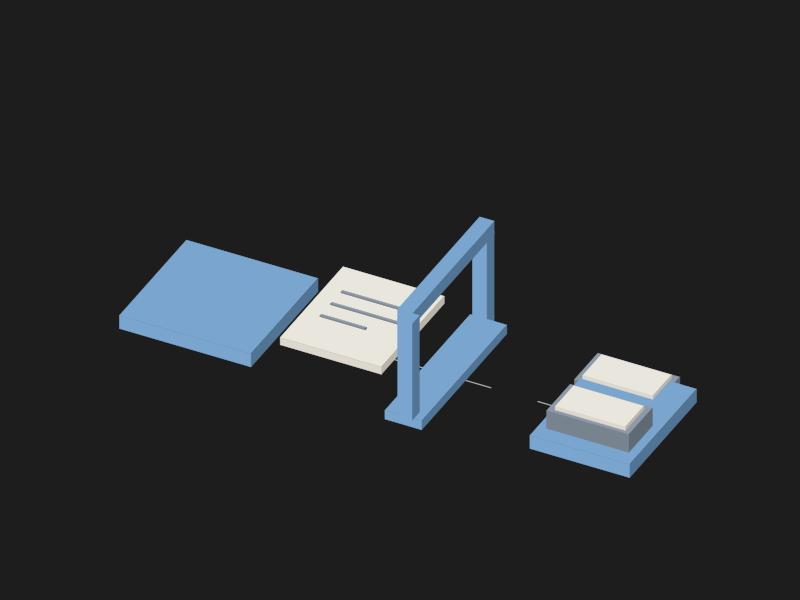 DraftSend limitsSent and Drafts
01 / 04Prepare the draft
The agent saves the message as a draft; that alone does not mean a person has approved it.
A draft does not mean a person has approved it. Disable sending through the gateway if someone needs to review every message.
Read all the steps
- Prepare the draft. The agent saves the message as a draft; that alone does not mean a person has approved it.
- Check the limits. Sending is a separate action, available only when enabled and within the configured mailbox and sender limits.
- Block another attempt. If the email service does not confirm the result, the gateway blocks another attempt to send the same draft.
- Check the folders. The check looks for evidence in Sent and Drafts; if the evidence is insufficient, the result stays unresolved.
Check the email the recipient receives
Send a test to a mailbox you can open on your phone. Check paragraphs, links and the signature. For a reply, check that it appears in the right conversation.
An agent using the gateway can write in Markdown. The software renders the email, adds the signature configured for that sender and quotes the original message in replies. The formatting reference also explains signature handling.
A signature must be saved before it can be used. The software cannot supply a missing job title, phone number or company details on its own.
How we use Yempik Mail Gateway
At the time of release, we use the gateway across ten mailboxes on Gmail, Microsoft 365 and Zoho Mail. Working with our own email is what led us to build these controls.
Yempik Mail Gateway is an open-source server using MCP (the protocol that connects AI agents to other tools and data). It connects Claude, ChatGPT and other compatible clients to company mailboxes through the providers’ official APIs.
Simone Bova and I maintain the project. Version 0.1.0 was released on 6 November 2026, under the MIT licence. The code is on GitHub, where you can read it line by line.
It needs to be deployed and maintained. Someone technical must connect the mailboxes and keep the installation up to date. It sends through company mailboxes and does not provide a bulk email service. It can read received messages, but cannot forward, move or delete them.
There are limits to consider before adopting it. The roadmap still includes reading attachment content and sending attachments, scheduled delivery, automatic follow-ups and push notifications for replies. There is no built-in suppression list yet, so people who must not be contacted again need to be managed separately.
The gateway does not judge whether an agent’s sales claims are accurate. Someone still needs to be responsible for reviewing the content.
What to decide on Monday with sales and IT
- The sales manager chooses the mailboxes. Specify which ones the agent can use and for which messages. Leave unrelated mailboxes out of the trial.
- IT sets the limits. Configure caps for each mailbox and sender, and check the domains, especially new ones.
- The sales manager assigns a reviewer. Name the person who checks and sends the first drafts. Decide which errors must prevent a move to autonomous sending.
- IT shows the team where to check outcomes. Demonstrate a successful send, a rejected one and an uncertain result in a controlled test.
- Management names the person who can stop the agent. That person tests the kill switch before the agent starts work on sales mailboxes.
To fit this trial into a wider project, start with integrating AI agents into your company. Simone’s article on putting an AI agent into production explains how to define the work with the people who know it. The AI governance guide for SMEs covers responsibilities and controls.
Frequently asked questions
Can an AI agent send emails on its own?
Yes, if its email connection supports sending and the company authorises it. With Yempik Mail Gateway, it can send only registered drafts within configured limits. Human review of every message is not automatic. To begin with drafts only, disable sending in the gateway.
Does it work with Gmail and Outlook?
Yempik Mail Gateway supports Gmail, Microsoft 365 and Zoho Mail through their official APIs. Outlook refers here to Microsoft 365 mailboxes. IT must configure the connection and authorise each mailbox.
Do I need a new domain to use an AI agent for email?
No. The gateway can use existing company mailboxes. A new domain is not required and does not guarantee better delivery. Decide with IT based on what you plan to use it for.
Will emails written by an AI agent end up in spam?
They can. Domain configuration, sender reputation, recipients and sending behaviour also matter. Gmail’s sender guidelines describe the checks to make. The gateway’s limits constrain volume but do not guarantee delivery.
Where this article’s evidence comes from
The ten mailboxes across three providers and the formatting incident are Yempik’s own experience, reported by Raffaele Zarrelli as of 6 November 2026. The forty-email scenario is hypothetical. Product capabilities refer to version 0.1.0.
Sources
- [1]Yempik Mail Gateway code and documentation. github.com
- [2]Draft delivery. github.com
- [3]Sender and mailbox limits. github.com
- [4]Checking uncertain sends. github.com
- [5]Controls and kill switch. github.com
- [6]Formatting and signatures. github.com
- [7]Version 0.1.0, released 6 November 2026. github.com
- [8]Planned capabilities. github.com
- [9]MIT licence. github.com
- [10]Google: email sender guidelines. support.google.com
The Yempik Mail Gateway repository contains the code and setup instructions for IT.